Posted | Modified
Author

It’s more straightforward to understand redundant data than non-redundant data. So when analyzing binaries we look for redundancy.

Low entropy score indicates the presence of redundant data. High entropy score, however, does not necessarily indicate the presence of non-redundant data. High entropy data may or may not be redundant.

To decide on if a high entropy data is redundant, additional analysis is required. There is no all-in-one solution to tell where the redundancies are.

The following examples describe organic samples that contain high entropy blocks and explain the redundancies in those blocks.

High Match Coverage in High Entropy Data

I created a plot with HexLasso by selecting ENTROPY and MATCH_COVERAGE_DWORD analyzers.

According the ENTROPY analyzer (red line), the block at offset 7168 has an entropy of over 90% which is more than 7.2 (out of 8).

The MATCH_COVERAGE_DWORD analyzer (green line) reports match coverage of over 90% for the same block.


The HexLasso plot of a sample showing high entropy (red) and high match coverage (green) between the data offsets 7168 and 8192.

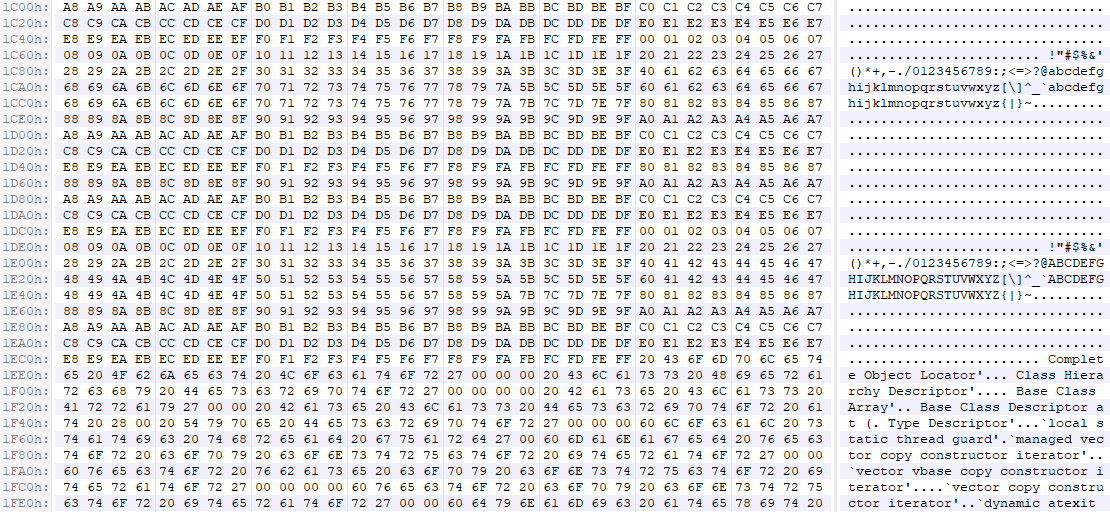
After viewing the hexdump of the block, the pattern in the data becomes obvious.

The first part of the data is a sequence of bytes, in incremental order, from 00 to FF. The sequence is repeated till more than half of the block.

The second part of the data contains text with some words repeating few times.


The hexdump showing a block of high entropy data taken from a sample at offset 7168 (1C00h). Matches can be seen all over.

High Coverage for Runs of Bytes in High Entropy Data

I created a plot with HexLasso by selecting ENTROPY and RUNS_OF_BYTES_MINLEN_4 analyzers.

According the ENTROPY analyzer (red line), the block at offset 44032 has an entropy of about 99% which is about 7.9 (out of 8).

The RUNS_OF_BYTES_MINLEN_4 analyzer (green line) reports runs-of-bytes coverage of about 99% for the same block.


The HexLasso plot of a sample showing high entropy (red) and high coverage for runs of bytes (green) between the data offsets 44032 and 45056.

After viewing the hexdump of the block, the pattern in the data becomes obvious.

Most of the data (apart from the first 8 bytes) can be described as a sequence of varying DWORDs, and each byte in a DWORD is the same.


The hexdump showing a block of high entropy data taken from a sample at offset 44032 (AC00h). Runs of bytes can be seen all over.

Posted | Modified
Author

Introduction

HexLasso CLI is a binary data analysis utility with command line interface that allows for static exploration of binary data.

HexLasso CLI takes input files and produces an interactive HTML file that can be viewed from a web browser.


The HexLasso plot of a high entropy sample showing increased matches in the second half of the data in green.

When the HTML file is loaded in the web browser, you can choose out of a list of analysis plots to be drawn. Such plots include entropy, match coverage, and byte frequency plots among others.

Plots you choose are combined into one overall graph which comes with the advantage to see the correlation between them.

The horizontal axis is the position in the data, and the vertical axis is the score between 0 and 100.

You can mark positions in the plot to display the data offset of important location.

Plots

You can choose out of a list of analysis plots to be drawn.

ENTROPY
ENTROPY_IN_ORDER_1
BYTE_PREDICTION_IN_ORDER_1
COMPRESSED_SIZE_DEFLATE_OR_DATA_SIZE
UNIQUE_DWORD_CNT
UNIQUE_WORD_CNT
UNIQUE_BYTE_CNT
MATCH_COVERAGE_WORD
MATCH_COVERAGE_DWORD
MATCH_COVERAGE_QWORD
BYTE_FREQ_ASCII_CONTROL
BYTE_FREQ_ASCII_PRINTABLE
BYTE_FREQ_EXTENDED_ASCII
BYTE_FREQ_00
BYTE_FREQ_FF
BYTE_FREQ_8B
BYTE_FREQ_E8_E9
BYTE_FREQ_MULTIPLE_OF_4
BYTE_FREQ_MULTIPLE_OF_8
WORD_FREQ_FF15
WORD_FREQ_FF25
MOST_FREQ_BYTE_VALUE
MOST_FREQ_BYTE_COVERAGE
STRING_COVERAGE_ASCII_PRINTABLE_MINLEN_4
STRING_COVERAGE_ASCII_PRINTABLE_MINLEN_8
STRING_COVERAGE_UNICODE_PRINTABLE_MINLEN_4
STRING_COVERAGE_UNICODE_PRINTABLE_MINLEN_8
RUNS_OF_BYTES_MINLEN_4
RUNS_OF_BYTES_MINLEN_8
RELATIVE_REFERENCE
DELTA_CH

System Requirements

The minimum required OS to run HexLasso CLI is Windows XP. A web browser with SVG and JavaScript support is required to run the interactive HTML file.

Development Details

HexLasso CLI is being developed in Visual C# 2010 and .NET Framework 4. It is entirely implemented in managed code.

HexLasso CLI is a spin-off project of BinCovery.

Posted | Modified
Author

This collection of public utilities will be useful for the exploration of binary data.

HexLasso Online
With HexLasso Online you can visually explore the structure of binary data to spot varying redundancies. You can choose between many analyzers to spot blocks of specific bytes, strings, runs of bytes, matches and code fragments.

Binwalk
Binwalk is commonly used for firmware analysis. With a diverse set of signatures built-in to recognize compressed stream, executable code, cryptographic markers and so on, you can use Binwalk to scan arbitrary binaries.

Visual analysis of binary files
Binvis.io is an interactive online utility for the visual exploration of binary data.

BinVis
BinVis (not to be confused with binvis.io which was developed by another author) is a binary file visualization prototype supporting many plots including byte plot, bit plot, RGB plot, entropy plot, and so on.

binocle
binocle is a graphical tool to visualize binary data. It colorizes bytes according to different rules and renders them as pixels in a rectangular grid.

hobbits from Mahlet-Inc
hobbits is a multi-platform GUI for bit-based analysis, processing, and visualization.

Strings
Strings scans the input binary for ASCII and Unicode texts.

byte-stats.py of Didier Stevens Suite
byte-stats.py is a tool that computes byte-level statistics for files.

binGraph
binGraph is a command line tool to plot entropy and histogram charts of binary data.

entroPy
entroPy visualizes the entropy of binary data in bird eye view that the darker an area the lower entropy it has.

The many hex editors
Free and commercial hex editors.

HexEd.it
HexEd.it is an online hex editor with data inspector.

ImHex
ImHex is an open source hex editor with rich feature set including disassembler support and night mode.

Deepmage
Deepmage is a hex editor that can handle data in units of arbitrary bit width.

hexyl, hexsa
They are hex viewers that produce hex dumps in colors to distinguish different categories of bytes.

HexWalk
HexWalk is an open-source hex editor/viewer and analyzer based on qhexedit2, binwalk and QT.

Multidiff
Multidiff compares multiple binary files.

FV program
FV program is a well-known utility in the compression development industry. It is used to visualize the matches in the data. There is a reference to FV in the Data Compression Explained book.

DataSmoke
DataSmoke aims to distinguish different data types (in order to choose the best compression method). It has multiple short algorithms and some are based on entropy calculation.

ent – A Pseudorandom Number Sequence Test Program
Ent tests the randomness of the content of a file. It uses various algorithms including entropy, chi-squared test, arithmetic mean, correlation coefficient, and so on.

file2img
file2img interprets the content of the given file as image with the option to select the pixel format.

Dump2Picture
Dump2Picture adds a BMP header to arbitrary file. The result can be viewed as an image.

QuickBMS
QuickBMS allows to extract content from compressed and encryped file formats.

Signsrch
Signsrch scans files to recognize compressed stream, encryption, checksum, and so on. It uses an external signature file.

NIST Statistical Test Suite
This research project can be useful to learn about approaches to analyze binary data.

Feel free to send an email about other valuable utilities on the topic.

Posted | Modified
Author

This collection of public resources will be useful to learn about static binary data analysis.

Recognizing patterns in memory (2022)

Malware Analysis with Visual Pattern Recognition (2020)

Reverse Engineering Game Files – d2i from Dofus (2019)

Bootstrapping Understanding – An Introduction to Reverse Engineering (2019)

Binary visualisation for malware detection (2018)

Beginning Statistics for Data Science: Analyzing Data (2018)

The case of the very large memory blocks of the same size, mostly zero, but whose nonzero bytes follow a pattern (2018)

Recovering Huffman tables in Intel ME 11.x (2017)

Unlocking the Beauty of Patterns in Binary Data (2017)

Database Reverse Engineering, Part 1: Introduction (2017)

Network Protocol Structures (2017)

Visualizing Binaries for Low-level File-analysis (2016)

An Analytical Approach to the Recovery of Data from 3rd Party Proprietary CCTV File Systems (2016)

Examining Unknown Binary Formats (2014)

Approaches to the classification of high entropy file fragments (2013)

Content Based File Type Detection Algorithms (2013)

Fast Forensics Using Simple Statistics & Cool Tools (2013)

Differentiate Encryption From Compression Using Math (2013)

Static analysis of an unknown compression format (2012)

A Visual Study of Primitive Binary Fragment Types (2010)

Visual Reverse Engineering of Binary and Data Files (2008)

Predicting the Types of File Fragments (2008)

Making Sense of Hexdump (2008)

How to crack a Binary File Format (2002?)

Feel free to send an email about other valuable resources on the topic.