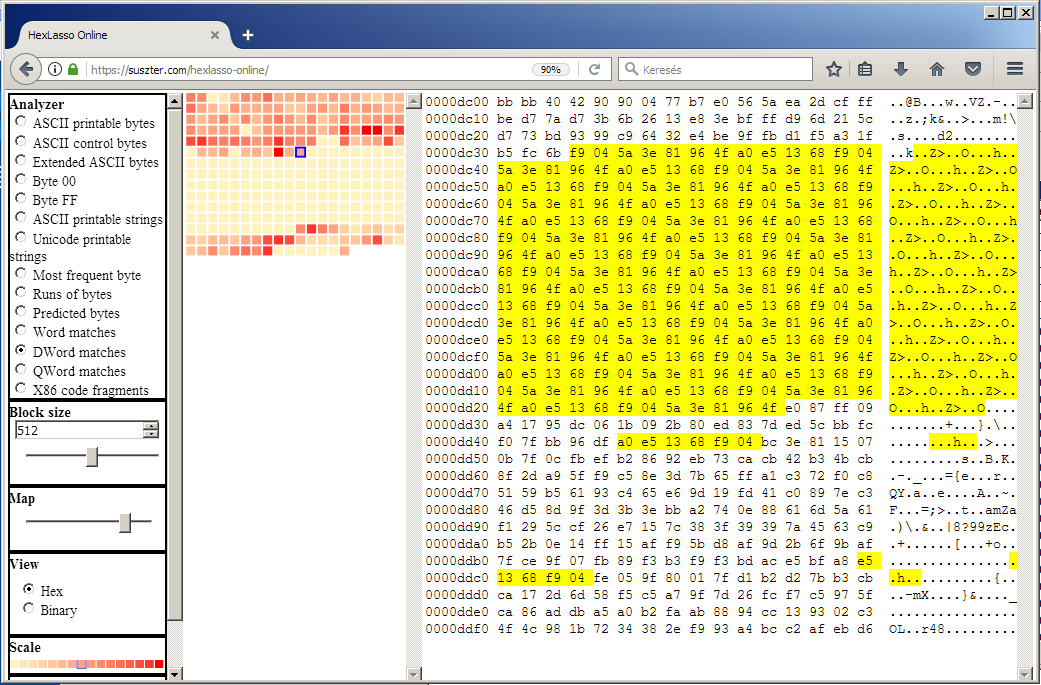
HexLasso Online is a binary data analysis utility, running in a web browser, that allows the user to interactively explore the file and spotting varying redundancies in it.
The utility splits the file into blocks of equal sizes, runs analysis individually on each block, and visualizes each block as a square on an interactive map.
The color of the square gives an indication of the analysis result of that block. Lighter color means lower byte coverage, darker color means higher byte coverage. The sequential palette used to color the blocks consists of 16 colors.
When the mouse cursor is moved over the map, the byte dump view of the corresponding block is displayed next to the map.
The byte dump view is either a hex dump view or a binary dump view depending on user preference. According to the analysis result of the given block, the corresponding bytes in the byte dump view are highlighted in yellow.
The user can choose from various analyzers. When an analyzer is selected the map will be updated according to the analysis result. Such analyzers involve byte ranges, strings, runs of bytes, matches and code fragments.
The block size can be changed during the analysis. A smaller block size leads to a more detailed map, and larger block size leads to a smaller map.
HexLasso performs the byte coverage analysis through analyzers and transformers.
The transformer is a routine to transform data of the given block to potentially improve the efficiency of the analysis. Transforms have their advantages because the transformed data might fit better into the pattern recognition and prediction models than the original data.
For example, if the match analyzer reports considerably better byte coverage of the given block with matrix transformation versus no transformation at all, then this information allows smartly guessing about the data without the need to manually analyze the actual bytes. Increased match coverage after matrix transformation often indicates an array of fixed-width values where the low bytes of the values are keep changing and the high bytes are fixed. After performing the matrix transformation, the fixed values will be arranged together that they will form better match coverage when running the match analyzer on the transformed data.
The transformation is a reversible process so the original data can be restored without data loss.
The length of the transformed data is the same to the length of the original data.
The transformer is being called by the analyzer and passes the transformed data back to the analyzer.
There are number of transformers but only certain analyzers use transformers.
The transformation might affect the entropy and the match coverage of the block.
HexLasso performs the byte coverage analysis through analyzers and transformers.
The analyzer is a dedicated routine to perform pattern recognition and prediction of the given block. The result is the byte coverage, that is how many bytes are covered by the pattern and how many bytes are predicted. The minimum possible value is zero, the maximum possible value is the size of the block in bytes.
The analyzer directly reports the byte coverage but it might call transformers to transform the data prior to the analysis. The transformation might be needed because the transformed data might fit better into the pattern recognition and prediction models.
The analyzer reports only on the bytes covered by the pattern recognition or prediction. For example, if there is a long sequence of ASCII bytes, the analyzer might report string regardless of what are the bytes which are not covered by the pattern recognition or prediction.
There are number of analyzers, and each analyzer runs on the given block.
If the string analyzer reports to cover, say, 60 bytes out of 64 bytes, then the result could be meaningful enough for the analyst.
However, if the string analyzer reports to cover, say, only 5 bytes out of 64 bytes, then the string might not be the one that describes the block in meaningful way. Ideally, there should be another analyzer covering more bytes. The analyzer that covers for the most bytes will describe the block.
HexLasso maintains a priority list of analyzers that each analyzer is given a distinct priority. If two analyzers report the same byte coverage then the analyzer with the higher priority will describe the block.
When considering two analyzers, the one which can more accurately detect the redundancy is given the higher priority. For example, the string analyzer is given higher priority than any of the match analyzers.
Here is a list of five random things about entropy.
1. The order of bytes in the data does not matter when calculating the entropy of the data. The entropy will always be the same regardless of the order of bytes. That has consequences. Here are few:
High entropy data does not necessarily mean random data (albeit random data always has high entropy).
High entropy passkey in itself does not mean the passkey is a good choice for authentication.
You can bring up the entropy of the data to arbitrary value. By appending content to the data to have an equal distribution of all bytes, the newly created data will have the maximum entropy of 8.
2. Let’s assume the data of 1000 bytes in length has the entropy of 4 of the maximum 8. It means, from data compression standpoint, that 1 byte can be stored in 4 bits meaning the data can be compressed to 500 bytes. This compression ratio is guaranteed, however likely better ratio can be achieved depending of what is known of the data.
3. Entropy analysis is often used to detect redundancy or anomaly in data. It is possible that the stream of data has an entropy of around 7 throughout the length but there is a structural change in the stream that does not noticeably show up in entropy change. In such case, another approach would be needed to try detecting the structural change, such as match analysis.
4. Usually, publicly available tools calculate entropy on byte-level, in which case the maximum entropy is 8 because the byte has 8 bits. However, it is possible to calculate entropy on nibble-level and on word-level, in which cases the maximum entropies are 4 and 16.
5. The higher the entropy, the lower the redundancy. The lower the redundancy, the higher the entropy. They are inversely proportional.
Match analyzers in HexLasso look for matching byte sequences in block of data and return the byte coverage of the found matches.
It is possible that no match found in the block, and it is also possible that all the bytes are matches.
HexLasso implements three type of matching algorithms and the difference between them is the width of the matches.
If the block contains QWord matches, it consequently contains DWord matches, and it consequently contains Word matches.
For example, by following the links you can see Word, DWord and QWord matches of a given block.
The presence of the matches in the block indicates some sort of redundancy. However, the match analyzers are given lower priorities than many other analyzers because they cannot be specific on what the redundancies are.
There are many other analyzers that can be more specific on what the redundancies are though. For example, the Byte00 analyzer returns the byte coverage of 00 bytes in the block. Therefore, the Byte00 analyzer is given a higher priority than the match analyzers. As a consequence, if the Byte00 analyzer and the match analyzers return with the same byte coverage on a given block then Byte00 analyzer will be reported.
So match analyzers are used as a fall-back mechanism when specifics on the redundancies are not well known.