Posted | Modified
Author

I run FF-16 on notepad.exe from Windows, twice with different parameters.

With the -cpf 40 parameter, the result of the run is shown on the left side of the image.

With the -cpf 40 -z 2 parameter, the result of the run is shown on the right side of the image.
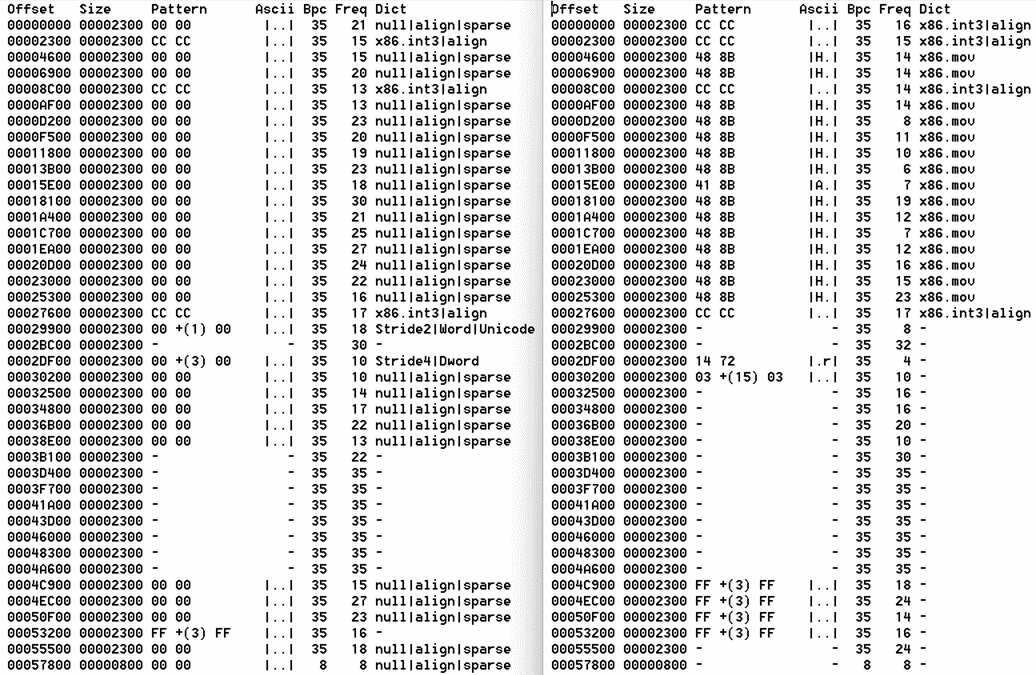
CPF stands for Chunks Per File. -cpf 40 requests that the analysis result to be summarized into 40 chunks (i.e., 40 lines). The reason for requesting a specific chunk size is to control the length of the output. It trades detail for compactness.

The -z 2 parameter runs a filter to remove 00 patterns. 00 bytes are ubiquitous in binary files. They can reveal the length of structures, but they also contribute to noise. In the left analysis, many 00 patterns are present, and I wanted to see whether more meaningful frequent patterns could be uncovered.

A quick side-by-side comparison of the two outputs shows that meaningful patterns appear in both analyses, so I decided to create a merged output that contains the meaningful patterns from both results.

Below is the result of the merge.
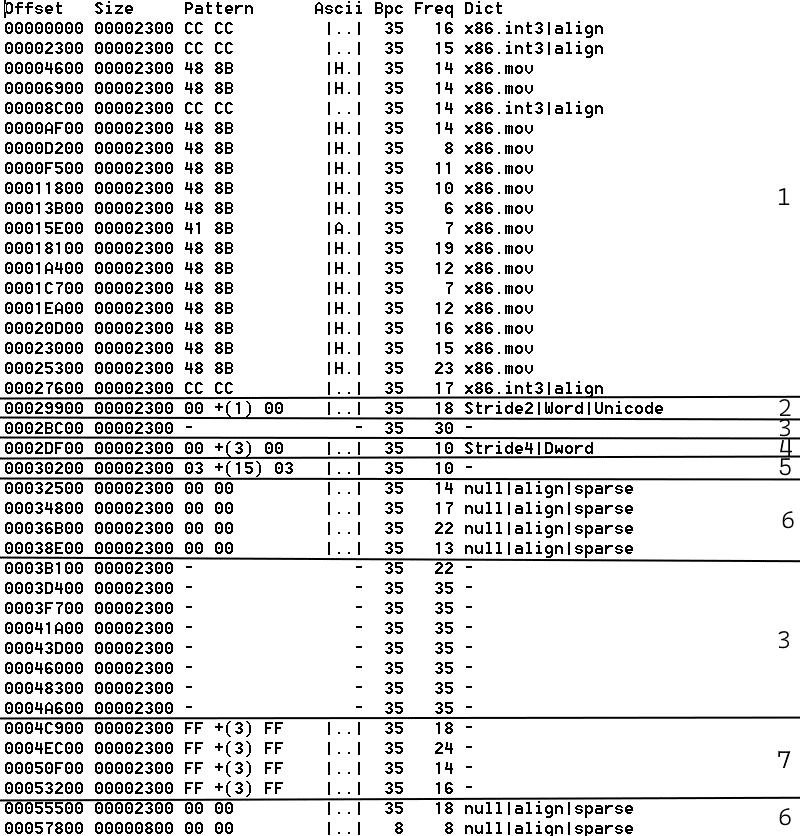
From the merge, seven different layouts can be identified.

Layout 1: Patterns resembling x86 mov / int 3 instructions.

Layout 2: In chunk 00029900, patterns of 00 ?? 00 suggest a sequence of 16-bit values.

The blocks from chunk 00029900 are listed below. When not using the -cpf parameter, FF-16 by default displays block-level results.
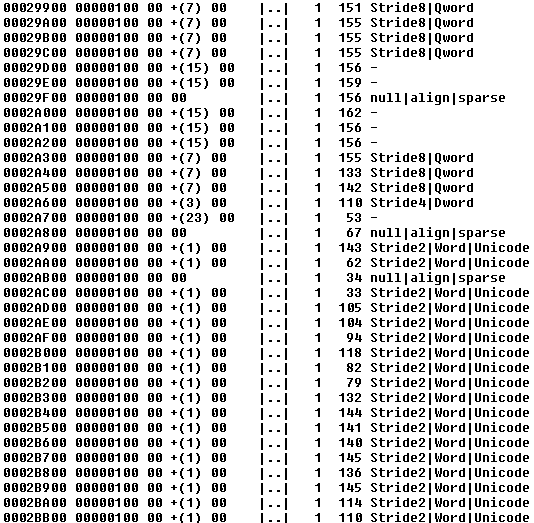
Below is a dump of the block at the first occurrence of 00 +(1) 00 in the chunk of 0002A900.
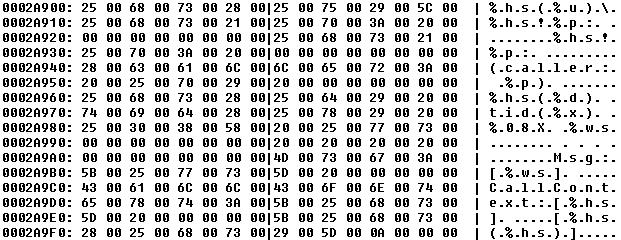
Now the dump confirms the presence of UTF-16 strings.

Layout 3: The - in the Pattern column indicates that no statistically significant pattern was found. It suggests random, encrypted, or compressed data.

Layout 4: The chunk summary indicates that a sequence of DWord values with byte 00 dominates.

Layout 5: The chunk summary indicates that a sequence of 16-byte structures dominates.

Layout 6: The chunk summary indicates that consecutive zero bytes dominate.

Layout 7: The chunk summary indicates that a sequence of DWord values with byte FF dominates.

References

Categories

Posted | Modified
Author

What does FF-16 do?

FF-16 is a static analysis tool that finds frequently occurring local 16-bit patterns across the entire file. It can help to locate structures from frequent patterns and understand file layout.

Command line usage

ff-16 [filename] [-d <filename>] [<-bpc <1..256>|-cpf <1..65536>>] [-g <0..127>] [-t <1..255>]
  <filename>      Target file
  -d <filename>   Dictionary file  (Default: dict.csv)
  -bpc <1..256>   Blocks per chunk (Default: 1)
  -cpf <1..65536> Chunks per file  (Default: not specified)
  -g <0..127>     Max gaps         (Default: 31)
  -t <1..255>     Freq threshold   (Default: 5)

The long description is available in the Readme file. The project is now public on GitHub.

Categories

Posted | Modified
Author

Building on the concept of the prediction table, the algorithm has been extended with a gap parameter.

Now, the algorithm predicts the most likely byte that comes after the current byte, allowing for a gap between them.

In practice, this means the algorithm can find frequent 16-bit patterns with gaps. The example below shows a gap of 3 bytes between two 00 bytes.

00 +(3) 00

The tool FF-16 (Find Frequent 16-bit) utilizes this algorithm.

FF-16 processes a file by splitting it into multiple 256-byte blocks, running the algorithm independently on each block. While the analysis occurs at the block level, the results are displayed at the bucket level, where a bucket consists of multiple blocks. This approach ensures that the user is not overwhelmed with excessive detail, making the output more practical to interpret.

Map View

When running FF-16 on notepad.exe the output looks like this.

BucketSize: 2816         0               1               2               3               4               5               6               7
Pattern     Ascii Blocks 0123456789ABCDEF0123456789ABCDEF0123456789ABCDEF0123456789ABCDEF0123456789ABCDEF0123456789ABCDEF0123456789ABCDEF01234567
00 00        |..| 542   |***********************************************************    ***** **** ********                       ********* * ***|
-               - 309   |                                                           ****                  *************************              |
CC CC        |..| 91    | ********* ******** ******                **  * ****** *                                                                |
48 8B        |H.| 68    |     ****  *** ****  * * *   **   ****     *   *  ******                                                                |
00 +(3) 00   |..| 42    |                                                              ****       *   *****                            * **  **  |
FF +(3) FF   |..| 42    |                                                                                                          ** *** ****   |
00 +(1) 00   |..| 41    |                                                          **  *  ** **      *   *                             *      *  |
00 +(7) 00   |..| 40    |                                                       ***      ****  **   ***** *                          *  *        |
00 +(11) 00  |..| 17    |                        *                                     *     *   **    *                                         |
00 +(15) 00  |..| 17    |                  *                                      *       ***  *     ***  *                                      |
02 00        |..| 15    |       ** * **   * ** *   *                                              *                                              |
01 00        |..| 12    |                  *      **     * *         *** *                                                                       |
FF +(11) FF  |..| 12    |                                                                                                                 **     |
00 +(19) 00  |..| 12    |                              *          *                      * *                                                     |
41 8B        |A.| 11    |                             * **      **                                                                               |
48 89        |H.| 10    |                              **        **                                                                              |
48 +(5) 00   |H.| 8     |              **    * * * **                                                                                            |
<LIST CUT HERE>

The map lists frequent patterns and marks buckets with * if they contain at least one block with a frequent pattern. The patterns occurring in more blocks are listed first. The map presents an overview of the file layout, showing the dominant patterns in different sections of the file.

Categories

Posted | Modified
Author

What is this screenshot about?

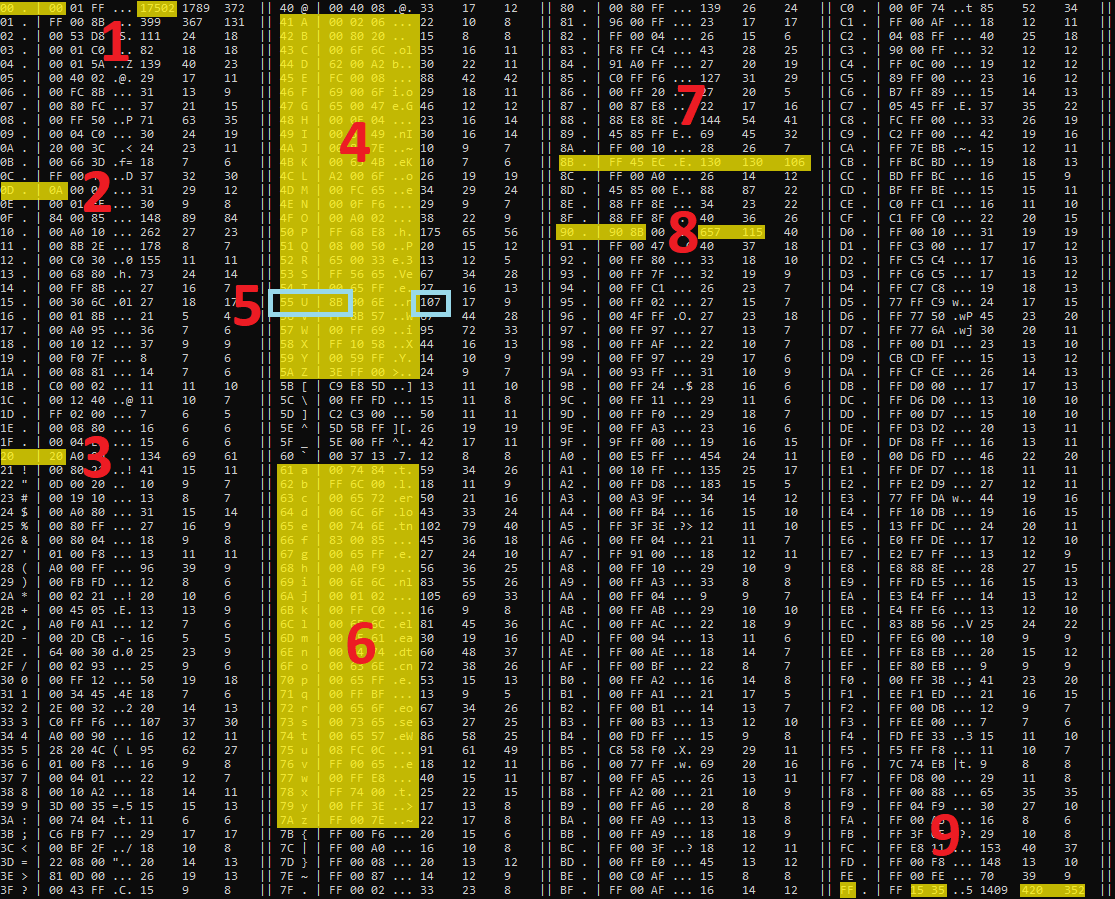
This is a prediction table which tells what is the most likely (second most likely, third most likely) byte which comes after the current byte.

The prediction table has 4 columns. Each column contains the current byte, the ASCII representation of the current byte, the top three bytes most likely come after the current byte, their ASCII representation, and the number of occurrences of the top three bytes in the context of the current byte.

The current byte ranges from 0 to 255, inclusive.

How the prediction table is useful for static binary analysis?

The biggest usefulness of what the prediction table provides is the reduction of the data while aiming to keep the key redundancies of the input data visible. The prediction table is always fixed in size regardless of the size of the input data, and it fits on a single screen. Therefore, it’s easier to analyze the resulting prediction table and easier to make automation on it.

The generation of the prediction table is a very straightforward and single-pass process, and therefore it’s a pretty fast one. And because of the simplicity, the algorithm is low risk to have errors that would lead to inaccurate output. It is simple to understand if the output is correct.

Redundancies which can intuitively be picked by the human eye when skimming through the data might be seen in the prediction table. Below is an example of how to read the prediction table of notepad.exe.

What can specifically be understood from the prediction table?

The screenshot of the prediction table is annotated by numbers in red.

Number 1

Quite often 00 comes after 00. Specifically, the occurrence of 00 in the context of 00 is 17502 which is the largest occurrence number in the table. It is commonly seen redundancy in EXE files because zeroes are used to fill slack space (to align section boundaries), used in header fields, and in x86 instructions.

Number 2

The most likely byte which comes after 0D is 0A. This sequence indicates a line break of CR LF. This kind of line break can be found in textual data handled by Windows applications. It is common to see that EXE files contain textual data like notepad.exe.

Number 3

Space (20) comes after space, or in other words, runs of spaces. Usually, this pattern is seen when there is indented textual data and for the indentation, spaces are used rather than tabs. In this case, there is an embedded XML-based document with space indentation.

Number 4-6

In most cases, an ASCII printable letter comes after an ASCII printable letter. That indicates the presence of text.

In many cases, 00 comes after ASCII printable letter. That indicates the presence of Unicode text.

Of course, both can be found in notepad.exe.

Number 5

Often, 8B comes after 55.

That’s a part of the sequence 55 8B EC push ebp; mov ebp, esp which is part of the x86 function epilogue and is commonly seen in EXE files.

Number 7

8B is a part of mov instruction which is one of the most often occurring instructions in x86 code in EXE files. And that’s why the top three occurrence numbers in the context of 8B are high compared to the occurrence numbers of many other contexts.

Number 8

These indicate sequences of nop (90) instructions sometimes followed by mov (8B) instructions. Again, note the occurrence number in the context of 90.

Number 9

The sequences FF 15 and FF 35 are parts of call and push instructions commonly found in x86 code in EXE files.

Note

There are other patterns that are not listed here nevertheless can be seen in the prediction table that confirm the presence of x86 code in EXE file. The goal here is to demonstrate that solely, prediction table is useful to make quick decisions on the content of the file.

Are there redundancies that this prediction table doesn’t pick up?

I used the simplest possible implementation of the prediction table generator. It makes sense to start with that.

A prediction table made by an enhanced generator could pick up more interesting patterns and redundancies, for example when the correlated byte is not the following byte to the current byte instead the correlated byte is at an arbitrarily chosen distance from the current byte.

Posted | Modified
Author

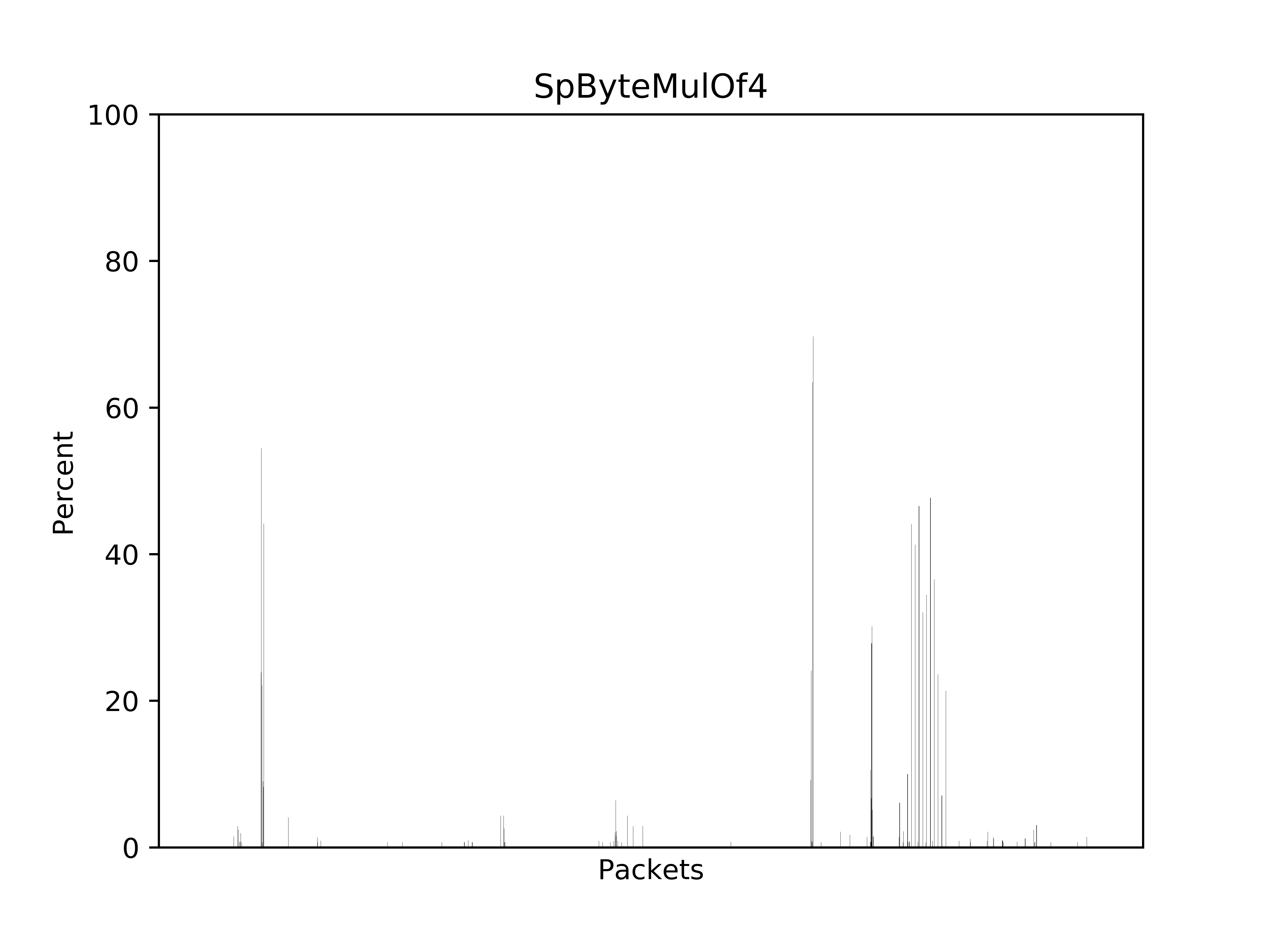
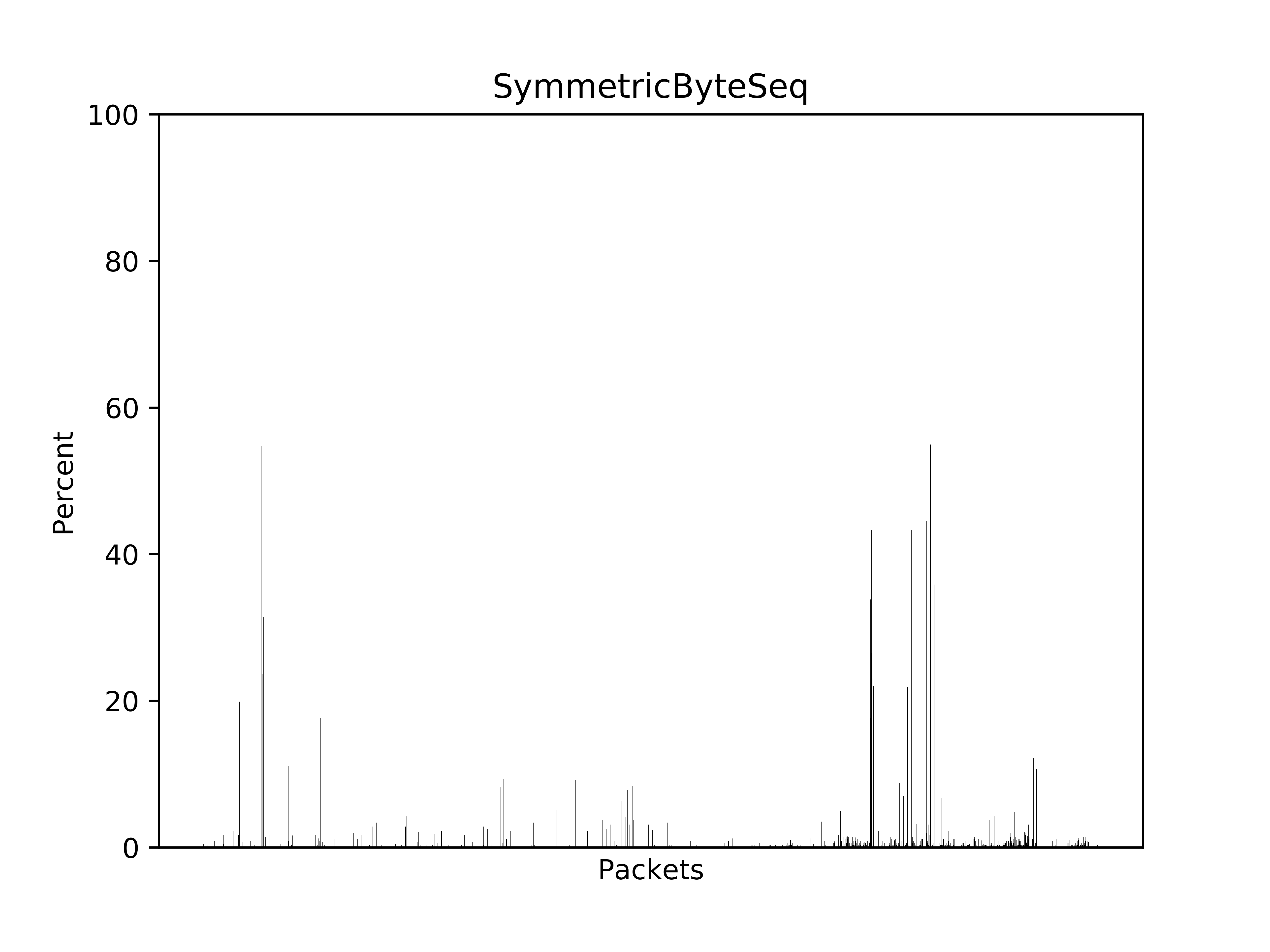
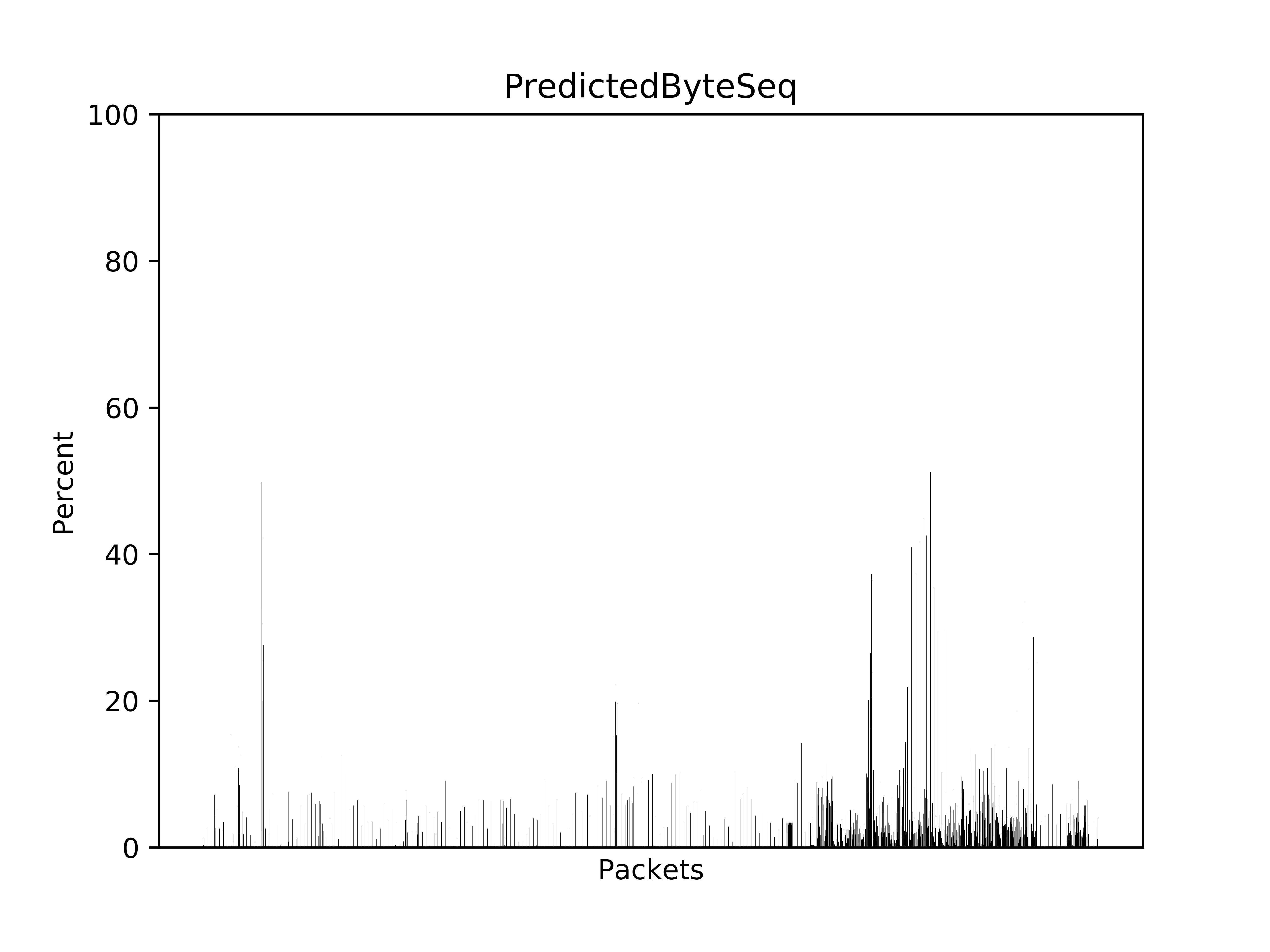
Since HexLasso can also be run on small chunk of data to provide accurate results it can be used to analyze the characteristic of network packets.

In the experiment, 2593 TCP packets were captured using Wireshark with the filter of tcp.payload and !tls. The captured packets were exported and HexLasso was run on the TCP payload section of each packet.

The smallest packet has the size of 16 bytes, the largest one has the size of 1420 bytes.

The below table summarizes the result.

Analyzer Chart
AsciiByte PNG
ExtAsciiByte PNG
SpPredictedByte PNG
PredictedByte PNG
SpByteMulOf4 PNG
ByteMulOf4 PNG
SymmetricByteSeq PNG
SpSameByteSeq PNG
PredictedByteSeq PNG
SpIncByteSeq PNG
SpDecByteSeq PNG
SpSameByteDiffSeq PNG
IncByteSeq PNG
DecByteSeq PNG
SameByteDiffSeq PNG
SameByteSeq PNG
SameAsciiByteSeq PNG
SameDWordSeq PNG
X86Fragment PNG
ArmFragment PNG
SpAsciiString PNG
UnicodeString PNG
AsciiString PNG
AsciiStringOfDigits PNG
AsciiStringOfSpecial PNG
WordMatch PNG
DWordMatch PNG
QWordMatch PNG

The analyzer is the functionality that HexLasso used for analyzing the TCP payload.

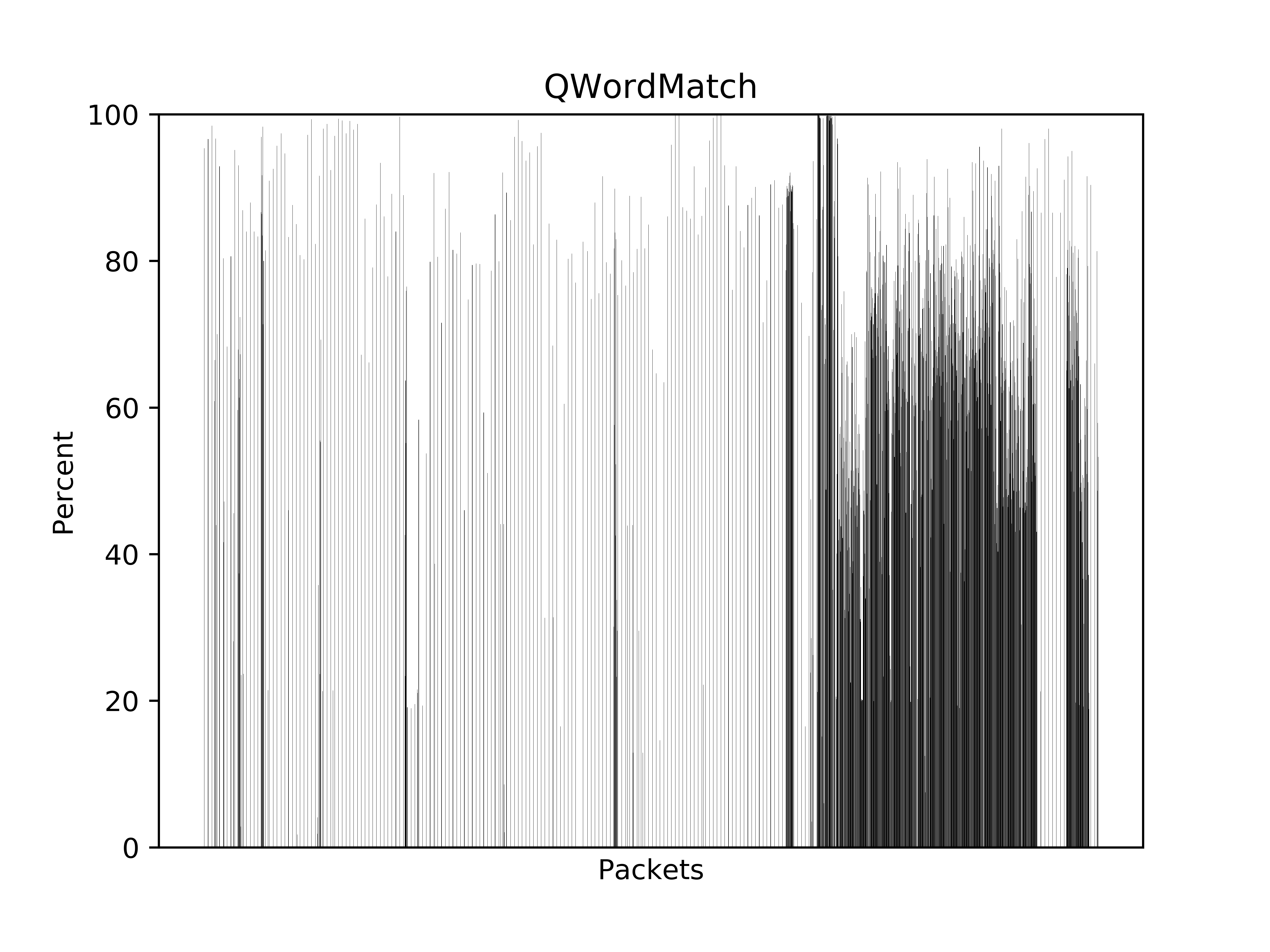
The chart shows the result of the analysis. The Y axis tells how much data is covered in each packet by the analyzer. The Y axis represents percentage. The X axis lists all the packets.